EZ Related Posts Plugin
This is the homepage of my WordPress EZ Related Posts plugin, which is currently running on Off Minor and providing the related posts messages (obviously).
Most WordPress ‘related posts’ plugins try and do everything automagically, by searching through your post list for other posts that share nominal keywords… But they seemed to be essentially just returning search results… So I knocked this up, because I thought it would be more meaningful and accurate. It’s also a bit more efficient than some other plugins that provide the same sort of system.
Plugin Installation
- Download the php source to somewhere useful (get it here)
- Upload it to your WordPress’
/wp-admin/plugins/plugin folder. - Activate the plugin within your WordPress Dashboard
Usage
Each post must be assigned a series of tags (yes, by hand… I’m working on something to do this automatically for already-existing posts); this is acheived by adding a suitable ‘Custom Field’ to each post (ie, within the Write Post page). The php script uses a basic preg_all routine to extract the tags and convert them into an internal array, so you have to use a slightly stupid markup (I can’t really be bothered to do anything more complicated). That is, each individual tag must be enclosed within square brackets. Thus
[fish] [cheese] [milk]
might be a suitable field value for a post describing an interesting and novel cheese-based fish sauce, for example. Call the field ‘ezrelated’. Here’s a slightly obvious demonstration of how to do it (for this post, in fact):
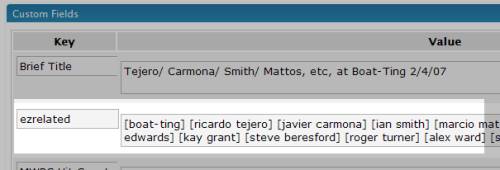
Related posts are found by searching for other posts which have any of [fish], [cheese] or [milk] in their ezrelated field. The posts are then organised by ‘relevance’ (the relevance score determined by the number of matching tags). So, if there are four posts with the following ezrelated fields:
[fish] [cheese] [milk][fish] [chicken] [cow][france] [germany][cheese] [milk] [yoghurt]
then the related posts for post (1) would be given as (4) and (2), in that order, since post (4) has an overlap of 2 tags, while post (2) has an overlap of only 1 tag.
Theme Integration
To generate the related posts message, drop this into your template files, at the relevant point for your scheme:
<?php ezRelatedPosts() ?>
This will print a heading-3 title ‘Related Posts’, and the five top related posts in an unordered list (unless there are no related posts, in which case it’ll just quit without printing anything. All the generated HTML is given a ‘related‘ CSS class, so you can modify the styling a little bit. You can also affect the output slightly by giving some more parameters:
ezRelatedPosts([number of posts], [html before], [html after], [key name])
- [number of posts] determines the maximum number of related posts to output. The default is 5.
- [html before] is a string containing extra html to output before the related posts section itself (on Off Minor, for example, I specify some extra div markup, and a heading to say ‘Related Posts’). By default, this string is ‘<h3>Related Posts</h3>’
- [html after] Should be self evident…
- [key name] By default, the tag keys should be named ‘ezrelated’. If you want to call them anything else, supply the alternative name here.
 RSS Feed
Leave a Reply